

Error page segmentation & infinite retry loop prevention
Feature Improvement When key engine processes — such as ID liveness, selfie (Passive) liveness, face comparison, or Korean government authenticity verification — fail consecutively, users were previously caught in an infinite retry loop. With this improvement, if the same error accumulates 3 times, the user is now directed to a dedicated error page for that specific error type instead of being offered another retry. Fewer than 3 occurrences are still handled with a recapture prompt or notification.New error codes
Engine errors (SE) — each engine has its own dedicated error page, so you can immediately identify which engine failed.
| Error code | Engine |
|---|---|
SE-50020 | ID Liveness |
SE-50021 | Selfie Passive Liveness |
SE-50022 | Face Compare |
SE-50030 | Korean government verification — Resident Registration ID |
SE-50031 | Korean government verification — Driver’s License |
SE-50032 | Korean government verification — Passport |
SE-50033 | Korean government verification — Alien Registration |
LO) — when the same error accumulates 3 times during ID capture or step processing, the user is moved to a loop-block page. Unmapped loop errors fall back to a generic page.
| Error code | Trigger condition |
|---|---|
LO-30001 | OCR ID recognition failure |
LO-30002 | Data processing error |
LO-30003 | Required parameter missing |
LO-30004 | requestId missing |
LO-30005 | ID image quality too low |
LO-99999 | Loop error not mapped to the above (Fallback) |
Error Handling Method — Warning conversion & Custom Policy integration
You can configure how each engine error is handled in the dashboard:Error (default — redirect to a dedicated error page) ↔ Warning (skip that verification and continue). This is set per item for ID Liveness · Selfie Passive Liveness · Korean government verification.
When set to Warning, the user is not redirected to an error page; only that verification is skipped and the subsequent KYC process continues. The resulting Warning record can then be caught by the “Warning occurred” trigger in Custom Policy, applying follow-up actions such as ARGOS Score penalties, holding (Pending), or rejection per your policy. (This follows the same pattern as the Expired ID Warning handling.)
To configure the Error Handling Method, see the Anti-Fraud & Forgery Prevention guide; to build a Custom Policy that uses the Warning, see the KYC Process guide; for the full error code mapping and error page definitions, see the Error Codes and Pages reference.
Unsupported browser and device notification improvements
Feature Improvement When users access the liveform from unsupported environments — including older browsers, environments without WebAssembly support, or devices running Android OS below version 9 — they previously received only a generic notice with no error code. This improvement assigns the error codeRT-60002 and includes a link to the supported environment guide. Clients can now immediately identify the reason for the block and provide users with specific guidance.
Administrator permission management (RBAC) improvements
New Feature Permissions (roles) for ARGOS internal administrators and project external administrators are now separated, with each role independently controlling which items can be viewed, modified, or deleted on the dashboard. Roles are divided into Owner, Leader, Member, and Guest.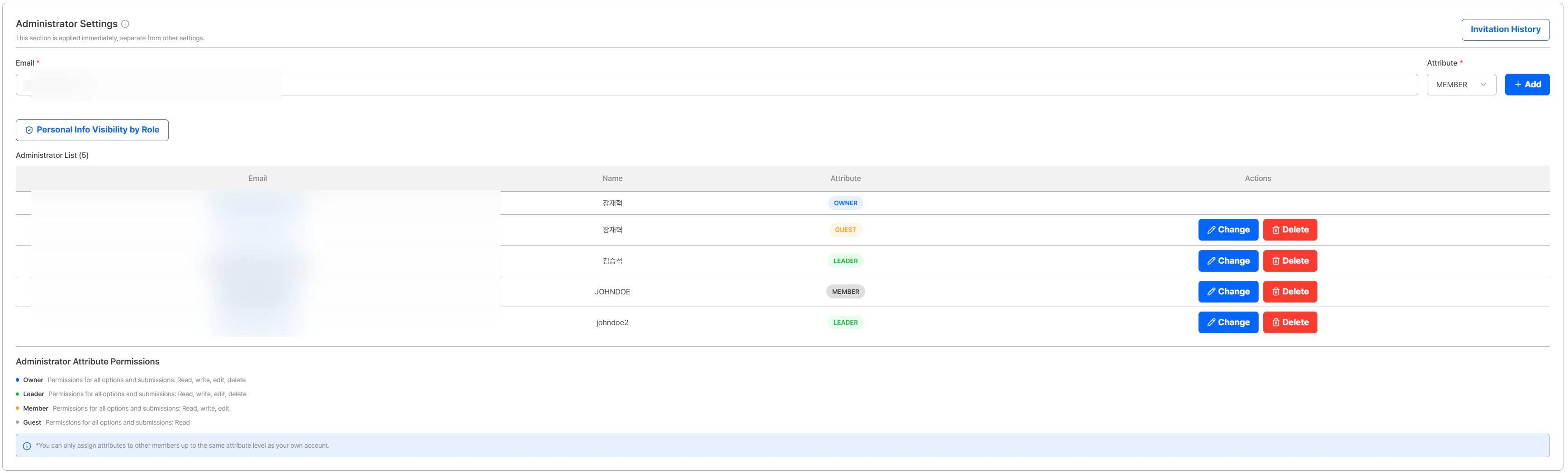
Personal information display control
Depending on the assigned role, data fields in a user’s submission are displayed masked. In the Personal Info Visibility by Role setting, you specify per item which roles (Owner·Leader·Member·Guest) can see each piece of personal information (PII) — such as resident registration numbers, document numbers, identification numbers, and ID card images — and any unchecked item appears masked to administrators with that role.Masking applies to on-screen display only; the actual stored data and API response data are not changed. (e.g., Name
John Doe → ***, Date of Birth 1990-01-15 → ****-**-**)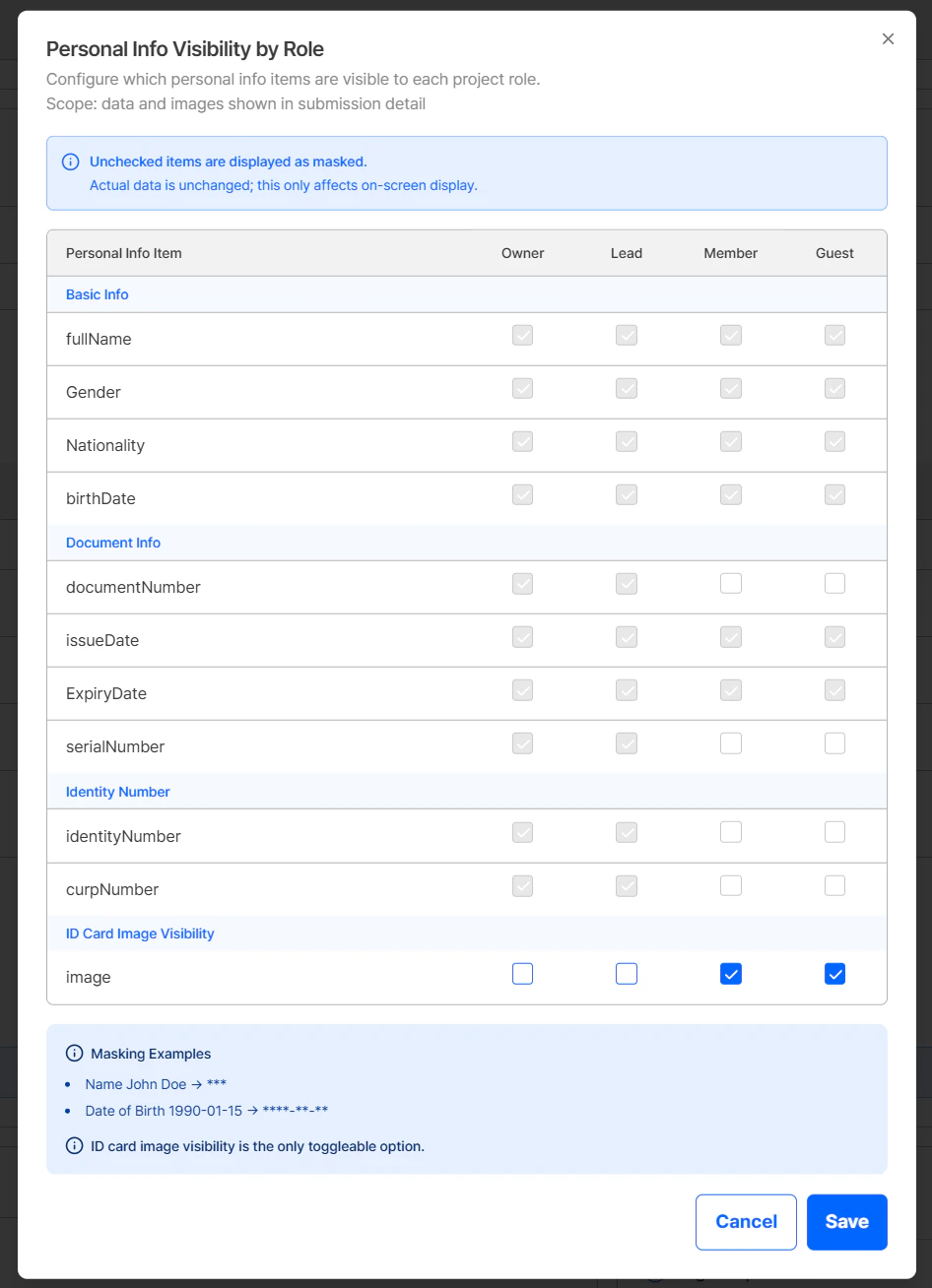
Currently, only the ID Photo (image) field can be adjusted in the Personal Info Visibility by Role setting. The other fields cannot be adjusted yet — configurable settings will be provided later.
Permission-based feature control
Actions that exceed a role’s permission scope — such as saving options, deleting records, or canceling administrator invitations — are handled consistently: the relevant button is either hidden entirely or accompanied by a permission notice. This prevents unauthorized operations at the source.ARGOS continues to improve its identity verification service for stronger security and a better user experience. Thank you for using ARGOS Identity. The ARGOS Identity team